
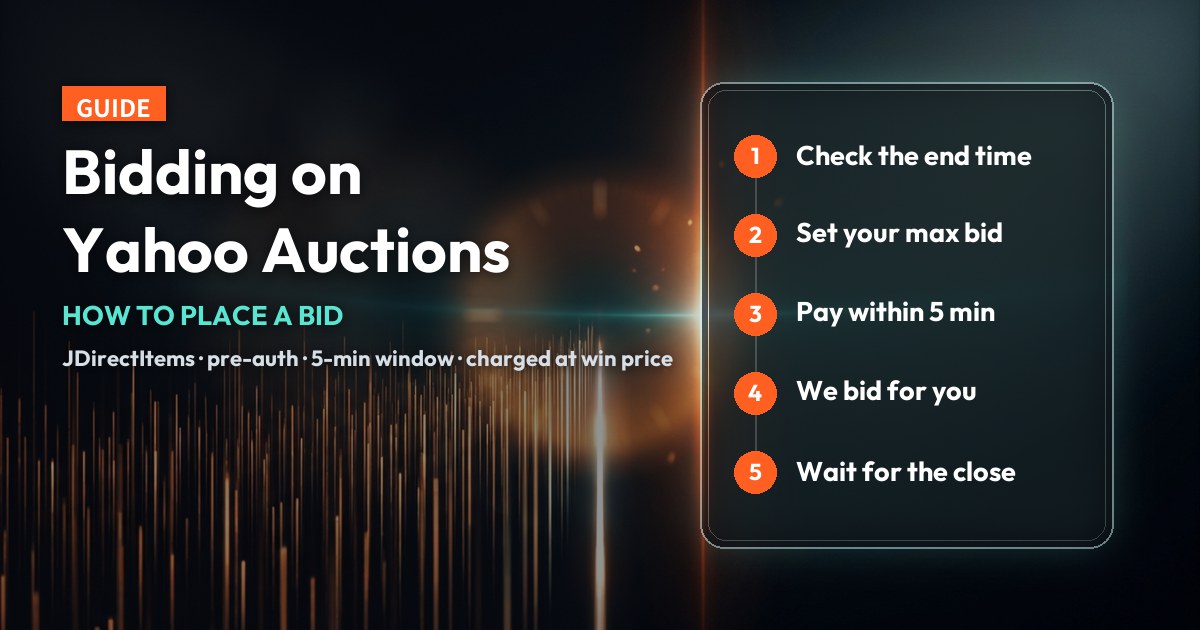
Yahoo! Auctions Japan — shown inside Collect2Day as JDirectItems Auction — is one of the main channels rare collectibles pass through, with an enormous number of listings closing every day. But an auction works nothing like an ordinary purchase. It has a closing time, it has competing bidders, and the payment sequence is reversed: you complete payment first, and only then does the system bid on your behalf.
This guide follows the order you will actually meet things: how a bid order differs from a normal one, the six-step flow, the five-minute payment window that catches most people out, what happens to your money whether you win or lose, and how to read each bid status in the app.
The short version
- Auction items cannot go in your cart. Each one becomes its own bid order holding exactly one item, with an order number beginning with B.
- You pay first, then the system bids. Your max bid is pre-authorised — a hold on your card, not a charge — and you have five minutes to complete payment after the order is created.
- You are charged the win price, not your maximum. If you win below your limit you pay the lower amount; if you lose, the hold is released and any coupon returns to your account.
What this guide covers
Bid orders and normal orders: four real differences
Everything else in this guide follows from this. On Collect2Day a bid order and a normal order are two different kinds of order, each with its own number format, payment behaviour and statuses — not two modes of the same thing.
A normal order is “pay now, it’s yours”. A bid order is “prove you can pay, and we’ll collect only if you win”. Every rule below is a consequence of that.
Why an auction item cannot go in your cart
This is the question new users ask most, and the answer is straightforward.
Because the outcome is unknown until the auction closes. A cart assumes several items, a known total, and one checkout. An auction listing has neither a final price nor a certain outcome, so putting it in a shared order would leave the system unable to total the order — and unable to handle the case where one item wins and another does not.
What that means in practice
- Bidding on three auction listings means three separate bid orders.
- Fixed-price items still work normally — several sellers, several marketplaces, one checkout.
- An auction item cannot be checked out with a fixed-price item, or with another auction item.
How to combine several sellers and marketplaces into one checkout is covered in the multi-platform cart guide.
Two kinds of auction listing, and the 5-day rule
Browsing auctions you will meet two types. The difference is whether the seller also offers an outright purchase price.
| Listing type | What you can do |
|---|---|
| Hybrid Bidding and buy-it-now together | Place a bid, or buy outright at the listed price |
| Bidding only | Place a bid |
Only auctions closing within 5 days accept bids
A bid order can only be created for a listing whose end time is within five days. The reason is the payment mechanism: the pre-authorisation on your card is valid for a limited period, and if it expired before the auction closed there would be no way to collect payment at the moment you win. So auctions that close further out simply have to be revisited nearer the time.
Check the listing’s end time first. If it is more than five days away, come back once it is inside the window. It does not mean the listing has a problem or that your account is restricted.
The full bidding flow
Six steps. The fourth runs in the opposite order to most auction sites, which is the part worth reading twice.
- 1Find the listing
Search and open the auction listing in the app.
- 2Check the details
Confirm the condition notes, the current bid, the bid increment and the end time. All four are on the listing page.
- 3Go to checkout
The auction item creates its own bid order, numbered from B.
- 4Set your max bid and pay
Enter the most you are willing to pay, then complete payment. This step must finish within five minutes.
- 5The system bids for you
Only once payment is complete does the system place your bid.
- 6Wait for the close
The status becomes Bid in progress, and the app notifies you of the result.


Most auction sites let you bid first and pay after. Here payment is authorised first so that the moment you win, the purchase can complete immediately — a seller in Japan is not left waiting on a transfer from an overseas buyer.
The five-minute payment window
Once the bid order is created you have roughly five minutes to complete payment. This is the single most important thing in this guide, because if the window closes, no bid is placed.
The bid order closes automatically, the status shows Closed, and no bid is placed for you. Any coupon you applied is returned to your account.
A failed payment does not mean starting over
If a payment fails — insufficient limit, a failed bank verification — you can simply try again inside the five minutes, as many times as you need. There is no need to abandon the order and build a new one. Each attempt is recorded separately. Only if the window expires with no successful payment does the order close, and only then do you start again.
Do the preparation while you are still browsing
- 1Confirm your payment method works
Check while browsing that your card details are saved, the limit is sufficient, and it clears your bank’s verification. Five minutes is not enough time to fix a card problem.
- 2Decide your maximum first
Settle on the most you are willing to pay before you reach checkout. Choosing a number while a timer runs is the decision people most often regret.
- 3Do not leave it to the last moment
On a popular listing close to its end time, five minutes is very short — and the item may go to someone else while you are still paying.
Discovering a card problem after the order exists usually means the window has gone by the time it is fixed. Sort out the payment method first, then bid.
What you are actually charged
This is the most misunderstood part, and the key to it is that there are two separate stages.
Pre-authorisation, then the charge
- 1Pre-authorisation, when the order is created
Your card is pre-authorised for the max bid you set. This places a hold on that amount — it is not a charge.
- 2The charge, only if you win
Only after you win does the system take payment, at the actual win bid price plus the other charges below.
This is the part of the mechanism that works in your favour. If you set a high maximum but the bidding stays quiet and you win below it, you pay the price it actually closed at — not your limit. So the max bid should be “the most I am willing to pay”, not “what I think it will go for”.
What makes up the final amount
These are the line names as they appear at checkout and on the order. Always take the amounts from the checkout breakdown:
- Win bid price
- What the auction actually closed at — not the maximum you set.
- Domestic shipping fee
- The seller’s shipping inside Japan, charged in yen. On auction listings this is very commonly paid by the buyer.
- Tax
- Japanese local tax, also charged in yen, shown as its own line in the order’s cost breakdown.
- Platform handling fee
- Collect2Day’s per-item service fee, set by region.
- Shipping fee
- Delivery from the Hong Kong warehouse to your address, charged at a flat rate by destination region.
- Coupon
- Any coupon applied, deducted from the total.
Every charge is itemised at checkout. If the price in the app differs from the source marketplace’s own site, go by the app: auction prices move with each bid, and the app has already converted the amount into your local currency.
Raising your bid
A bid cannot be edited. To go higher you create a new bid order, and once it is confirmed the earlier, lower one moves to Lost and its hold is released. That is the mechanism working correctly, not a failure.
Check whether it was your own higher bid that replaced it. If so, the new order is live — confirm it reads Bid in progress and there is nothing else to do.
What happens when you win
Nothing is required from you. The sequence runs like this.
- 1The status becomes Won
The win price is recorded and the app notifies you.
- 2Payment is taken
At the actual win bid price, plus the charges listed above.
- 3The bid order finishes
Its job is done and its status stops changing.
- 4A normal order takes over
The system creates a matching standard order, which carries the purchase through buying and shipping.
- 5Track it
Seller ships → Japan warehouse → Hong Kong warehouse → consolidation → local delivery.
The normal order created at that point carries exactly the same number as the bid order — the same B… reference. So when the same number appears in your order list, it is the same purchase continuing, not a duplicate.
What happens if you are outbid
If someone bids higher, or the auction ends without you as the top bidder, this is the sequence. None of it needs anything from you.
- 1The status becomes Outbid or Lost
Recorded by the system, with a notification in the app.
- 2The refund process starts
A request to cancel the pre-authorisation goes to the payment provider, and any coupon you used is returned to your account.
- 3The order closes
Once the payment provider confirms, the bid order moves to Closed and the process ends.
Once the authorisation is cancelled, the held amount takes some time to clear from your card account, and how long depends entirely on your issuing bank. You are not charged. If the hold is still showing after a while, check with your bank first.
Reading the bid statuses
Bid orders use their own set of statuses, separate from normal orders. These are the ones the app shows and what each means.
| Status | What it means | What you do |
|---|---|---|
| Bid in progress | Your bid is placed and the auction is running | Wait for the result |
| Outbid | Someone has bid above you | Create a new bid order if you want to go higher |
| Won | You won the auction | Nothing — it moves to shipping automatically |
| Lost | You did not win, or your own higher bid replaced this order | Nothing — the hold is released |
| Cancel | You cancelled before paying | Nothing |
| Closed | The order has ended — window expired, refund complete | Nothing |


Complete auction appears on the last screen and is not one of the six statuses above: it is what a won bid order becomes once payment has been taken and the purchase has moved to the normal order. If you see it, there is nothing left to do on the bid side — track the item under your orders.
The three usual reasons an order closes
- You did not win, and the order closed once the refund completed — much the most common.
- The five-minute payment window expired.
- You raised your bid, and a new order replaced this one.
Where to find your bids and orders
The app has a dedicated bid area covering both running and finished auctions, including past bid orders. If a bid you just placed is not there, check these two things first.
| What you are seeing | The likely reason |
|---|---|
| You just bid but there is no record | Did the payment complete? If it did not, or the window expired, no bid was placed and no order exists. |
| You know you won but cannot find it | A won order moves into the normal shipping flow — look under your orders, not your bids. The number is the same one. |
After paying, go back and confirm the status reads Bid in progress. That status is what tells you the bid was actually placed.
Common questions
Why can’t I put an auction item in my cart?
Because the result is unknown until the auction closes, so it cannot be totalled with other items, and the system could not handle one item winning while another loses. Each auction listing becomes its own bid order holding exactly one item.
I can see a listing on the source site but not in the app. Why?
Check its end time first — a bid order can only be created for auctions closing within five days. If it closes sooner than that and still does not appear, contact customer service and they can check the listing’s status.
How do I know the bid increment?
The listing shows the bid increment, which is the smallest step a bid can move by, and the app also shows the acceptable range when you enter your bid. Go by what is on screen.
Can I cancel after bidding?
You can cancel before payment completes, and the order shows as Cancel. Once payment is done and the bid is placed it cannot be cancelled — so be sure you want the item at that price before you create the order.
My payment failed. Do I need to create the order again?
No. You can retry payment inside the five-minute window as many times as you need. Only if the window expires without a successful payment does the order close and need rebuilding.
I raised my bid and the old order says “Lost”. Is that an error?
No. Raising a bid means creating a new bid order, and once it is confirmed the earlier lower one moves to Lost and its hold is released. Check that the new order reads “Bid in progress” and it is working as intended.
If the item closes below my maximum, what am I charged?
Only the actual win bid price, never your maximum. The total also includes Japanese local tax, the domestic shipping fee, the platform handling fee and the shipping fee, less any coupon. Every line is itemised on the order.
Am I charged anything if I lose?
No. The pre-authorisation is cancelled and no payment is taken, and any coupon returns to your account. The hold itself takes some time to clear from your card account depending on your bank.
I bid but nothing shows in my bid records.
Check whether the payment completed. If it did not, or the five-minute window expired, no bid was placed and no order was created.
I won but I cannot find the order under my bids.
Once payment is taken, a won order moves into the normal shipping flow — look under your orders instead. It carries the same B… reference the bid order did.
The price in the app differs from the source site. Why?
Auction prices change with every bid, so the two can be a moment out of step. The app also shows the amount converted into your local currency rather than yen. Go by the app.
Can a won auction ship together with my other orders?
Yes. Once won, the bid order becomes a normal order and follows the usual flow, so it is consolidated at the Hong Kong warehouse with your other paid orders. What auctions cannot share is the checkout, not the shipment.
Start with something you are not in a hurry for
Auctions move faster than ordinary shopping. For a first attempt, pick something inexpensive that you are not desperate to win, and walk the whole path once: set a maximum, pay, wait for the close, read the notification.
After that you will find only two things really need preparing in advance — a payment method you know works, and a maximum you have already decided on. The app tells you what comes next at every other step.
No account yet, or no delivery address set? Start here: the Collect2Day sign-up guide
Ready? Browse collectibles on Yahoo! Auctions Japan and bid in your own currency.
Browse auctions